Turn more wedding enquiries into booked viewings.
Venquire drafts a warm, accurate reply to every enquiry from your own venue details, follows up politely when couples go quiet, and lets them book a viewing in a couple of taps. You approve every message.
- Guided online setup, designed to take around 15 minutes. No sales call.
- Nothing is sent to couples until you've approved it.
- Free during early access. No card needed, and nothing is charged.
Less admin between an enquiry and a viewing
Every couple wants a quick, personal reply with the right details. Venquire takes care of the repetitive part, so your team can spend its time with the couples who are ready to visit.
Reply fast, without retyping
Each enquiry gets a reply drafted from the prices, capacity and availability you've confirmed. Read it, tweak it if you like, and send.
Follow up without remembering
Friendly follow-ups are planned for couples who go quiet, and stop by themselves the moment a couple replies or books.
Viewings booked, no back-and-forth
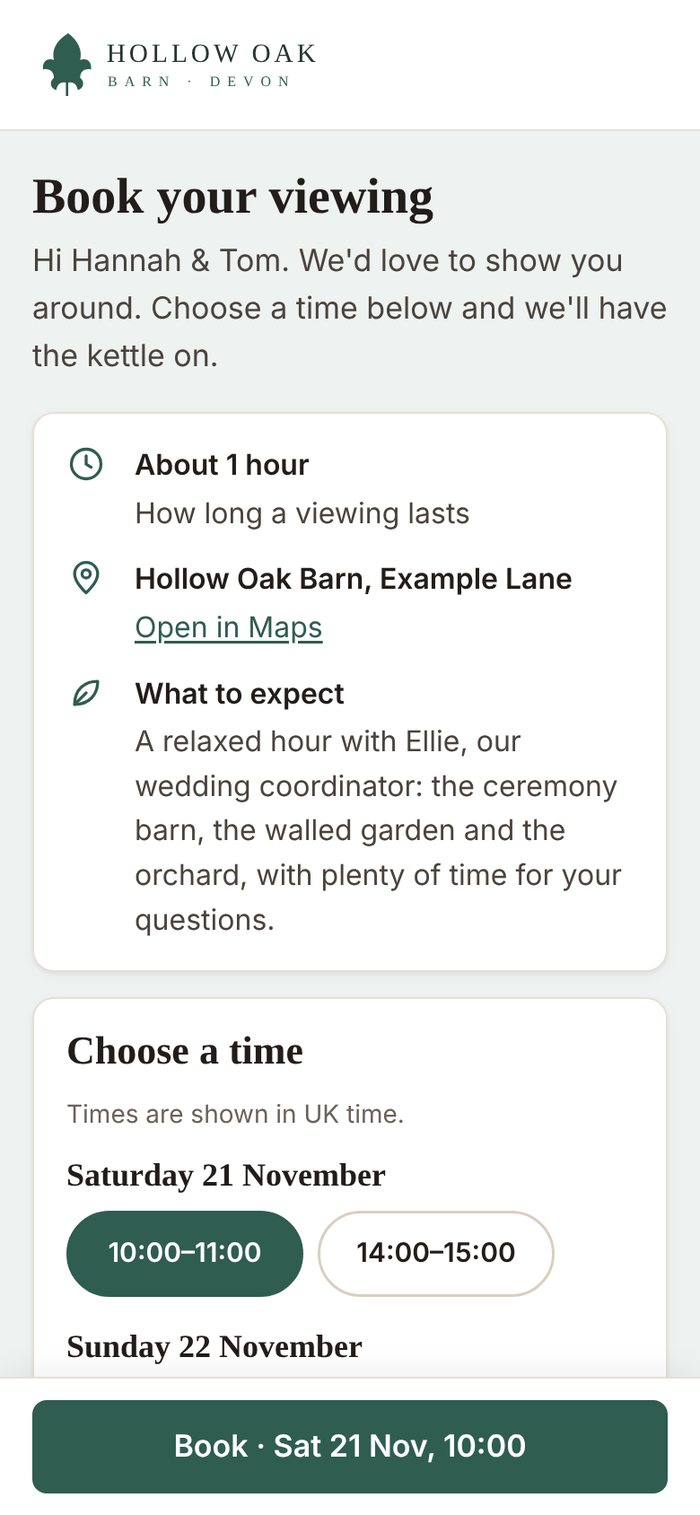
Couples pick one of your viewing times from a private link on a page branded as your venue. You can see every booking straight away.
From enquiry to booked viewing in four steps
No new inbox and no new habits. Venquire works alongside the email account you already use.
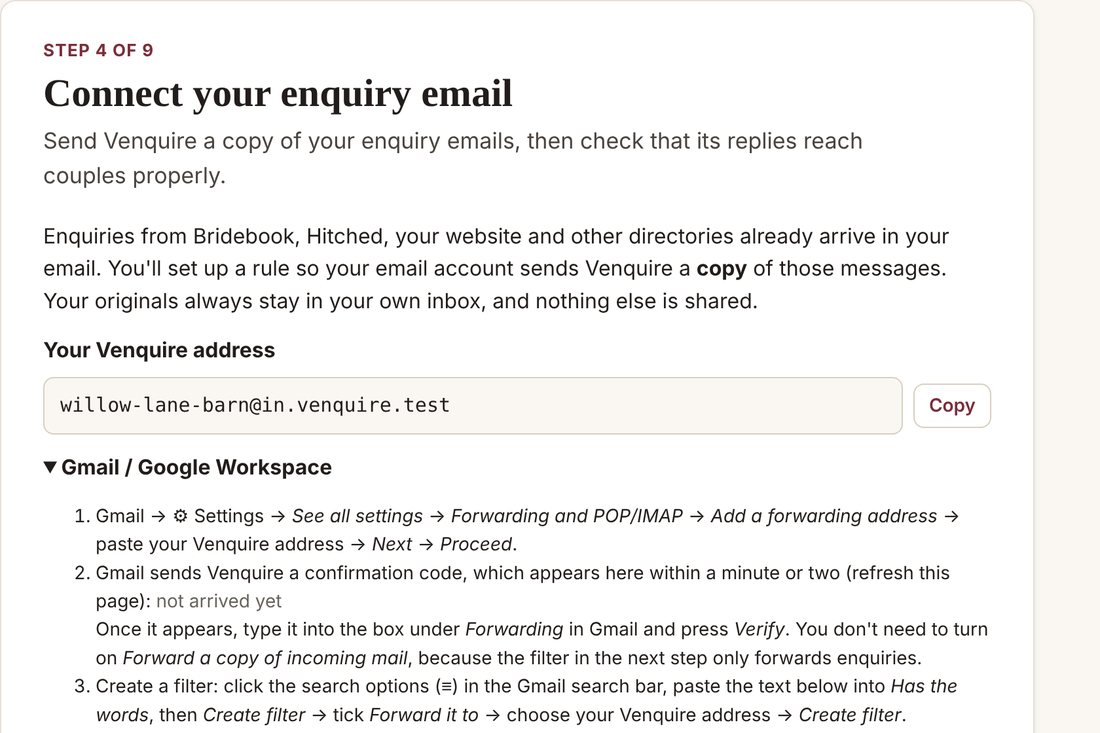
Forward a copy of your enquiries
Set up a simple forwarding rule in Gmail, Outlook or your email provider. Setup shows the exact steps and lets you test it in a minute.
- Your original emails stay in your own inbox.
- Works with directory enquiries and your website form, as long as they arrive by email.
- Nothing else in your mailbox is shared.
A reply is drafted in your voice
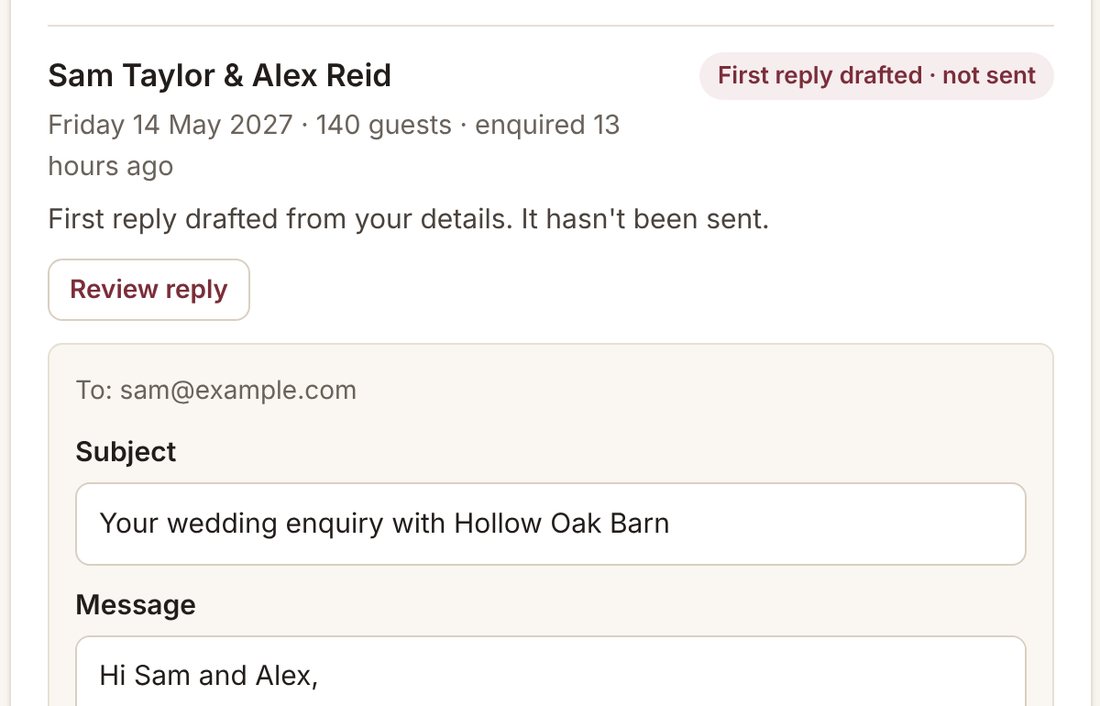
Venquire reads the couple's date, guest numbers and questions, checks your diary, and drafts a reply using the wording style and details you've confirmed.
- It only states what you've told it: prices, capacity, availability.
- If something's missing, it leaves a clear gap for you to fill in rather than guessing.
You approve, in a click
Every morning, your Today page shows which couples need you, which viewings are coming up and what's already been handled. Review a reply right there, edit anything, and approve it.
- Nothing is sent until you press Approve.
- During early access every message waits for your approval. Optional automatic sending for tested message types is planned for later.
Couples book a viewing themselves
Your reply includes a private booking link. Couples see only your genuinely free viewing times, on a page with your venue's name, logo and colours, and book in a couple of taps.
- Times come from the viewing slots you set, in UK time.
- Couples can change or cancel without creating double bookings.
- Follow-ups stop automatically once they've booked.
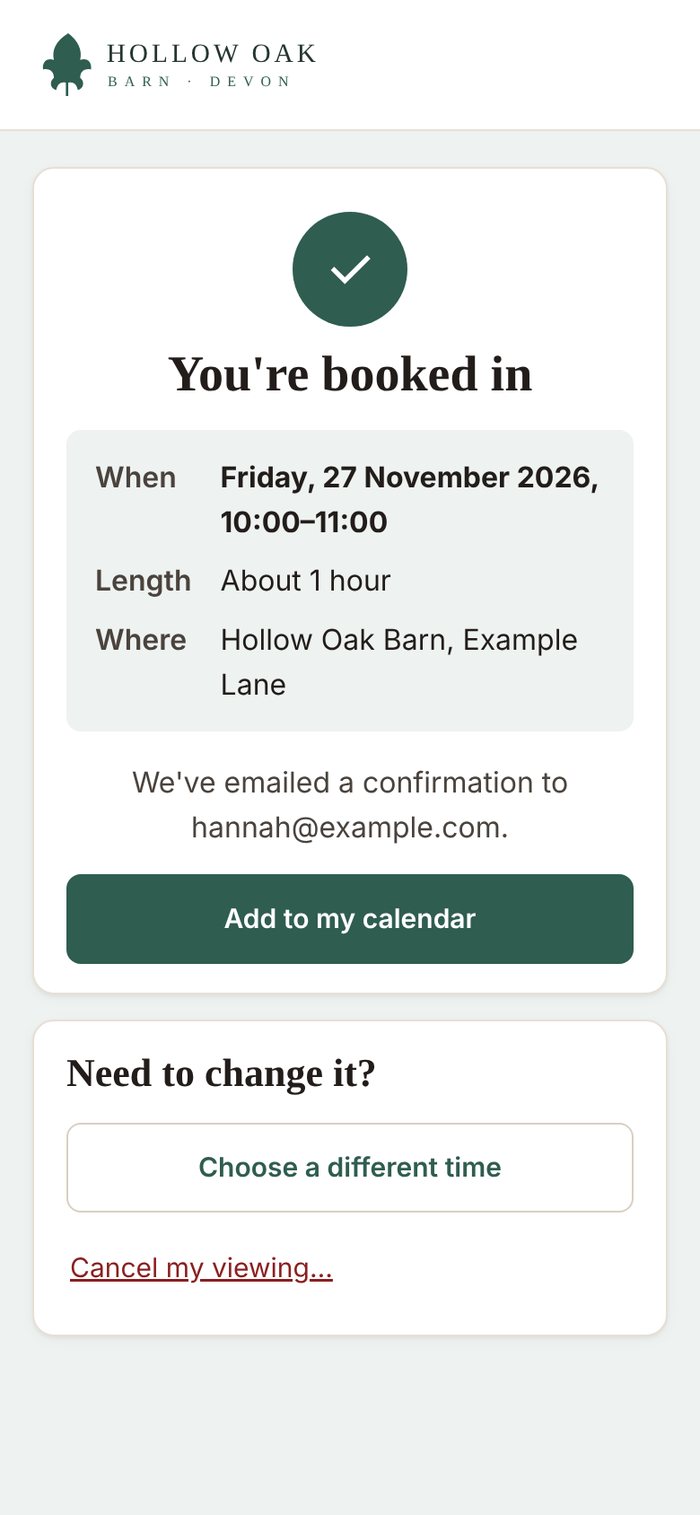
Screenshots show Venquire with a fictional example venue.
Open it in the morning and know exactly what to do
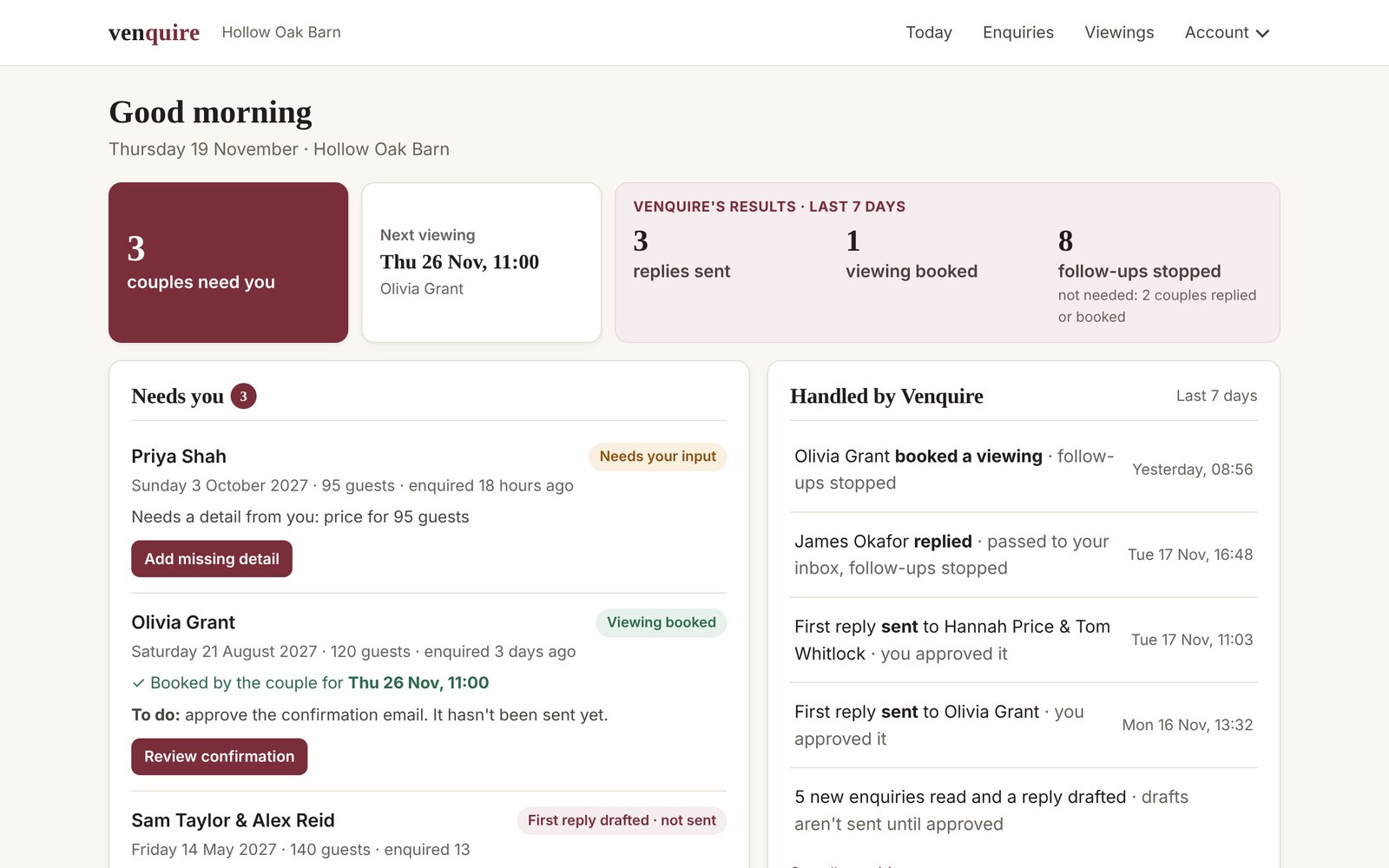
Your Today page puts the couples who need you first, shows what's coming up, and lists what Venquire has already taken care of.
Needs you
Each couple waiting on you, with one clear action: review a reply, add a missing detail, or approve a viewing confirmation.
Coming up
Booked viewings and this week's follow-ups at a glance, so nothing catches you by surprise.
Handled by Venquire
Replies sent, viewings booked and follow-ups stopped, from what really happened. Plus a short summary every Monday.
Your venue, your words, your approval
Approval first, always
By default every message waits for you: first replies, follow-ups and viewing confirmations. Open a draft, change anything, approve it or choose not to send it.
- Opening a draft never sends it.
- Drafts with a missing detail can't be sent until it's filled in.
- Every message shows clearly whether it's drafted or sent.
Automatic sending: planned, and only if you want it
Switched off for everyone during early access. When it's available, you'll be able to let Venquire send message types you've tested without waiting for you, and switch it off again at any time.
- Only for message types you've tested.
- Only for drafts with nothing left to fill in.
- Off by default, and you can turn it off again whenever you like.
What happens to an enquiry
From a directory, your website form or a direct email, into your normal inbox.
Your forwarding rule sends a copy. The original stays where it is.
Using only the details you've confirmed, with any gaps clearly marked.
The reply goes out, follow-ups are planned, and the couple can book a viewing.
Free during early access.
Venquire is currently in a free early-access pilot: there's nothing to pay and no card is needed. The plans below are our planned prices once paid plans open. Before then we'll confirm the price with you, and you choose whether to carry on. Nothing is ever charged automatically.
Prices are the full amount you pay. We're not VAT registered, so no VAT is added.
Standard Venue
For one venue.
- Unlimited enquiries
- Reply drafts, approvals and follow-ups
- Diary check and branded viewing booking
- Today page and Monday summary
Group
For up to three venues under one login.
- Everything in Venue, for each venue
- Switch between venues in one account
- One bill for the group
Join as a founding venue
Founding places will be limited to 20 venues. Request a founding place now and we'll confirm the founding terms with you before anything is charged.
Charged from the day you switch Venquire on, then monthly. Your £149 price is fixed for your first 24 months from activation. Cancel any time.
Paid once. Your 12 months start on the day you activate, not the day you pay. Renewal is optional and never automatic.
Founding Year refund protection: if Venquire can't make its service available for you to activate within 30 days of you completing every setup step, you can ask for a full refund. This doesn't affect your legal rights.
Planned prices, not yet on sale. No setup fees. When paid plans open, monthly plans can be cancelled from your Billing page at any time.
Good to know
Do I need to change my email or how I work?
No. You keep your inbox, your directories and your website form. You add one forwarding rule so Venquire receives a copy of enquiry emails, and your originals stay exactly where they are.
Does it work with wedding directories?
Through email. When a directory emails you an enquiry, your forwarding rule sends Venquire a copy. We're still checking each directory's email format during early access: if a directory's email doesn't include the couple's own email address, you may need to reply through the directory instead. Venquire doesn't connect directly to directories, CRMs, Instagram, Facebook or WhatsApp.
Will it send anything without me?
No. During early access every message waits for your approval. Optional automatic sending for message types you've tested is planned for later, and will always be off unless you switch it on.
What if a couple asks something Venquire doesn't know?
It leaves a clear gap in the draft, for example "price for 95 guests", for you to fill in. A draft with a gap can't be sent until it's completed. Venquire never makes up prices or availability.
How long does setup take?
The guided setup is designed to take around 15 minutes if you have your details to hand. Connecting some work email accounts can take a little longer. You can stop and come back at any time, and nothing is sent to couples until you've tested everything and switched Venquire on.
When am I charged?
Not during early access: it's free, and no card is needed. Before paid plans open we'll tell you the price, and you choose whether to carry on. Nothing is ever charged automatically.
What happens at the end of a Founding Year?
We'll email you 60, 30 and 7 days before it ends with an optional renewal, which you'd pay once from your Billing page. Nothing renews or is charged automatically. If you don't renew, Venquire pauses and you get 14 days of read-only access to renew. After that the account is suspended.
What about couples' personal data?
You remain in control of your couples' data. Venquire processes it on your behalf to provide the service, keeps it only as long as needed, and lets you download or delete a couple's data at any time.
Can I cancel?
Yes. During early access you can stop using Venquire at any time, and download or delete your data from Settings. When paid plans open, monthly plans can be cancelled at any time from your Billing page.
Ready to spend less time on enquiry admin?
Set up Venquire for your venue online in one sitting. Nothing is sent until you approve it, and early access is free.
Request a founding placeVenquire is in early access: we open accounts by invitation and reply to every request personally, usually within one working day. Already invited? Start your setup.